Example Checkout Order
Order #SNG-EXAMPLE-1001
Welcome to SLABSNGRABSACO. I do all the heavy lifting so everyone can enjoy products at MSRP instead of inflated market prices. ACO means Auto Checkout. I run your account through my automated checkout setup using the information you provide, allowing you to purchase products directly from the retailer at the retailer's price and have the packages shipped directly to your home — cutting out the middleman.
I was once in your spot, trying to buy everything at market price, and eventually I had enough. This is my way of trying to give everyone a chance at getting the products they actually want. I do have to charge a monthly membership fee because running and maintaining the bots and infrastructure is expensive.
Whether you're growing your collection or just looking for some packs to rip, I look forward to helping you.
Have questions? Click the Discord link at the top of the page and drop us a message.
Simple plans. More profiles. More chances.
Your Success tab connects your profiles and detected retailer orders. Here is a sample of what your tracker can look like.
Example orders are for illustration. Your account shows only checkouts linked to your profiles.
Members can follow shipping progress directly from their Success page, including en-route status, estimated delivery, delivery date, destination address and a retailer tracking link when available.
Order #SNG-EXAMPLE-1001
Example shown for illustration. Signed-in members see shipping information only for orders linked to their own profiles.
ACO (auto-checkout) is evolving fast, with services constantly adapting to the backend changes retailers keep rolling out. The average win is about $120 of product at MSRP (and 2x+ that at market prices). Success isn't guaranteed — especially on hyped drops. Many factors need to be considered, such as site stability, influx of traffic to the site, amount of stock per item, etc. These are all key factors to consider. Most misses revolve around website instability and low-stock drops. USA retailers only.
Target, Walmart, Sam's Club,
Costco, PKC
Your information stays safe
Growing community of members
Flexible monthly plans built around your ACO profile needs.
Join the Discord and our team will help you pick the right plan for your goals and budget.
Enter your setup details, then continue to secure Stripe Checkout for your membership.
Follow the steps below to prepare your retailer accounts, email connection, IMAP app password, and ACO profiles.
SLABSNGRABSACO supplies Target and Pokémon Center retailer accounts. Walmart accounts are request-only; optional personal profiles and IMAP setup are explained here.
Your tier determines your included Target and Pokémon Center accounts. Walmart requires a separate request. Your own retailer profiles are optional.
SLABSNGRABSACO supplies Target and Pokémon Center accounts. Walmart is request-only; personal retailer profiles are optional.
One card per account is recommended, although some retailers may allow a card on more than one account. Plan roughly one shipping address for every 4–5 profiles. Add enough details for your profiles before a drop.
Discord is where important updates, product information, checkout activity, and support communication may be posted.
The checkout channel is used for successful checkout activity and order-related updates.
Monitor channels may display product releases and supported retailer drops. Turn on notifications only for the retailers and products you care about.
Check announcement channels for service updates and use the support channel when you need help with your account or setup.
Do not post screenshots containing order numbers, addresses, passwords, payment information, or other private information in public Discord channels.
If the website needs information, you will see an Action Needed checklist in My Profile and, when Discord is linked, a Discord message. Open the website to see the exact fields; never post private details in Discord. Once every required field is complete, the Action Needed channel message is removed and a completion notification appears on the website.
We supply Target and Pokémon Center accounts. Walmart can be requested; personal retailer accounts are optional under Saved Checkout Details.
Your retailer email and password are used to sign in to the store itself. Your IMAP email and app password are used for your email inbox. They serve completely different purposes.
Used to log into Target, Walmart, Sam's Club, Costco, or another supported retailer.
Used when email access is needed for order confirmations or verification messages.
Before submitting a retailer profile, open that retailer's website and make sure you can successfully sign in using the email and password you plan to submit.
Target and Pokémon Center accounts are provided by us. Walmart is available by request. Only add a login if you choose to run your own Costco or Sam’s Club account. Use Saved Checkout Details to add another.
Your membership tier determines how many profiles can run. Add valid shipping addresses and payment cards as needed; SLABSNGRABSACO provides Target and PKC accounts. Walmart is provided only when requested.
When you are running multiple accounts, use as many legitimate shipping addresses and payment cards as you reasonably have access to. Retailer systems may compare order details across orders. If several orders contain identical or highly similar information, they may be reviewed as duplicates and can be cancelled.
You do not need to create a separate Pokemon Center account or manually build a Pokemon Center login profile. Pokemon Center uses guest checkout, so SLABSNGRABSACO can prepare the profile using the email, shipping address, and payment information you already supplied.
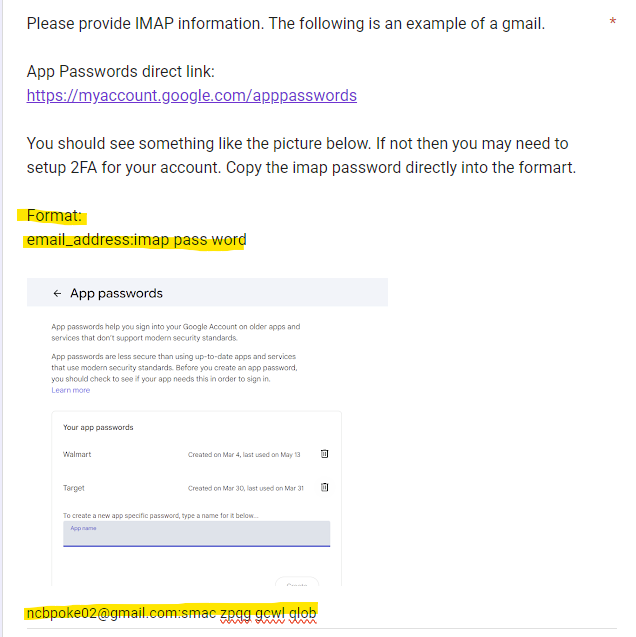
Some retailer setups may require access to an email inbox so order confirmations and verification messages can be detected.
Your IMAP email is the email inbox being connected. Your IMAP app password is a special password generated by your email provider. It is not your normal email account password.
Open your email provider in a browser and sign into the email account you plan to use for ACO.
Make sure you can access the inbox before continuing.
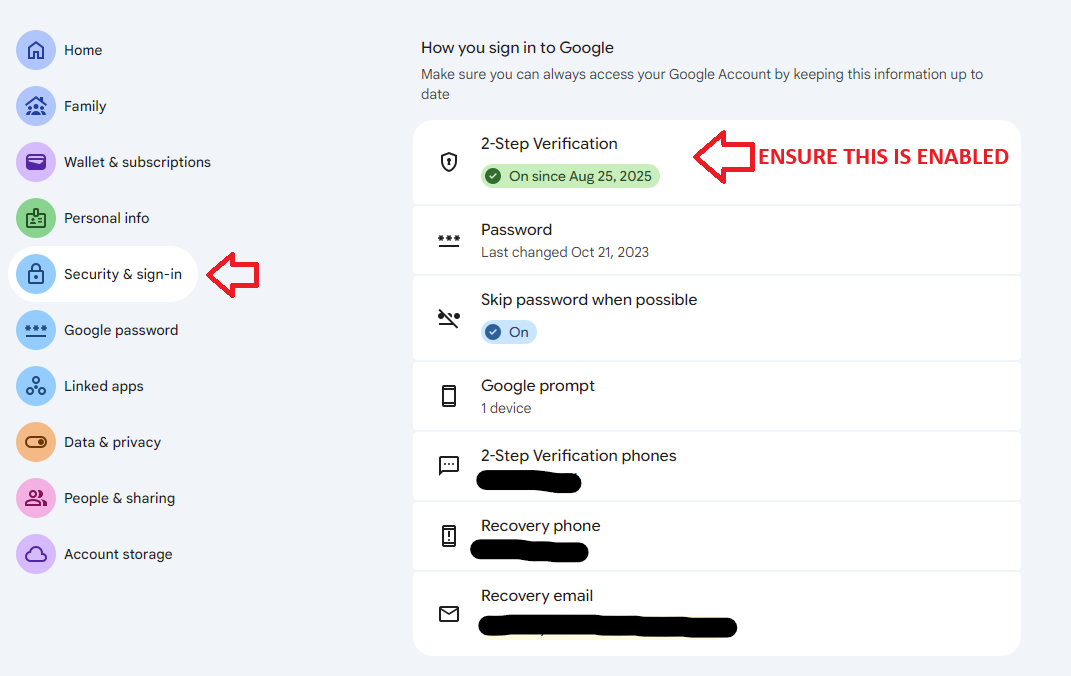
For Gmail, open your Google Account and go to:
Google Account → Security → 2-Step Verification
Follow Google's instructions and make sure 2-Step Verification is fully enabled.
First confirm that 2-Step Verification has been completely enabled on your Google account.
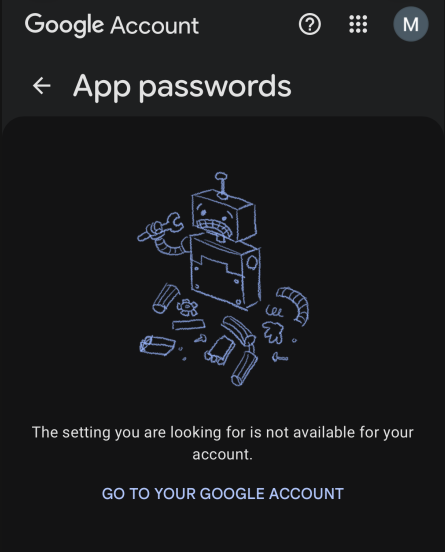
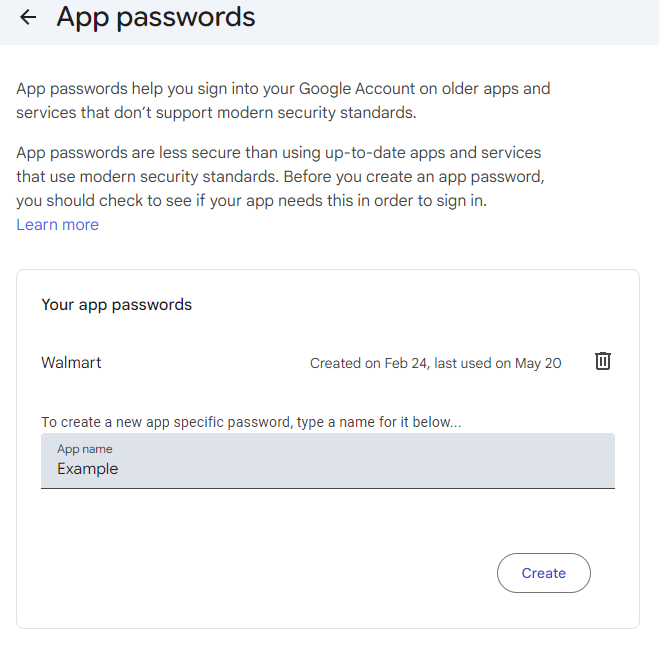
After 2-Step Verification is enabled, open the App Passwords section of your Google account.
Google Account → Security → App Passwords
Enter a name that will help you recognize the connection later.
Examples include:
After entering a name, select Create.
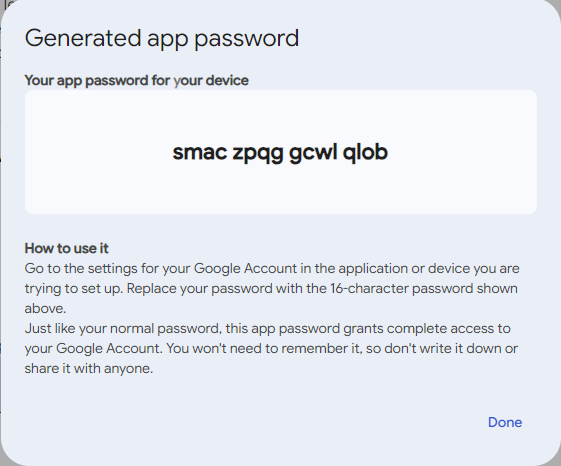
Google will display a generated app password. Copy the entire code before closing the window.
The IMAP App Password field should contain the generated app password, not the password you normally use to sign into Gmail.
Return to your profile setup form.
Enter:
RETAILER EMAIL + RETAILER PASSWORD =
store login.
IMAP EMAIL + APP PASSWORD =
email inbox connection.
Enter the requested shipping, contact, billing, and payment information for the profile.
Check every field carefully before submitting.
Target and Pokémon Center logins are supplied by staff; Walmart is request-only. Your own optional retailer accounts can be added under My Profile.
Remember: these are the credentials used to log into the retailer website itself. They are not your IMAP credentials.
If your setup requires an email connection, enter the IMAP email and generated app password you created in Chapter 02.
Verify your:
Once everything has been reviewed, submit your profile. If you need help, use the support channel in Discord.
An export-ready profile needs the required name, email, phone, street address, city, state, ZIP, and country information completed.
The profile also needs a valid card number, cardholder name, expiration month, expiration year, and Security Code.
If Admin shows MISSING FIELD, complete the listed information before the profile can be included in an export.
When all required checkout information is complete, the profile can show EXPORT READY. Profiles with missing required information are skipped from ready-only exports until the missing fields are completed.
When a Gifted profile reaches the end of its active period, it is removed from your active Linked Profiles.
The same managed account or accounts are reserved for your account for up to 7 days after expiration, unless Admin releases them earlier.
If the same Gifted access is restored during that hold, the reserved managed accounts can be reconnected to your Linked Profiles.
Customer-specific shipping and payment information is removed from the expired managed assignment before it can be returned to the normal account pool.
Verify the IMAP email and generated app password. Remember that IMAP credentials are different from retailer login credentials.
Contact support in Discord and include the profile or retailer you are having trouble with, plus the exact error message you see. Do not post passwords, full card numbers, or Security Codes in public Discord channels.
Everything you need to know about SLABSNGRABSACO before getting started.
You provide the information needed to create your ACO profiles, including your retailer accounts, shipping information, payment information, and any required email connection information.
Your profiles are then used with our automated checkout setup for supported retailer drops.
ACO means Auto Checkout. It uses automated checkout tools to attempt purchases during supported product releases.
No. ACO does not guarantee a successful checkout on every release.
Success can depend on product stock, retailer traffic, retailer restrictions, account status, profile quantity, and other conditions during the drop.
Current memberships support profiles for Target, Walmart, Sam's Club, Costco, and PKC.
The number of profiles you can create depends on your membership tier.
You will need the information requested in the profile form, including shipping, billing, payment, and contact information. Optional Costco or Sam’s Club credentials can be added separately.
You can add your own retailer logins if you choose. Target and Pokémon Center accounts are provided by SLABSNGRABSACO; Walmart is request-only.
No. These are completely separate.
Your retailer email and password are used to sign into the retailer account such as Target or Walmart.
Your IMAP email and app password are used for the email inbox connection when email access is required.
An app password is a separate password generated by your email provider for use with an application or service.
If your setup requires IMAP, enter the generated app password instead of your normal email account password.
View the IMAP setup guide →Yes. Your profile allowance is based on the membership tier you purchased.
Higher membership tiers include additional ACO profiles.
View membership plans →Yes. Sign into My Profile to view and manage the profile information associated with your account.
Go to My Profile →Sign into My Profile and open the Membership section.
Your account displays your membership status, period end date, and the number of days remaining.
If you have a problem with setup, your membership, or one of your profiles, use the support channel in Discord.
Open Discord →Pick the profile allowance that works best for you and get your setup started.
View PlansManage your membership, orders, retailer profiles, and account security.
Sign in to view your membership, orders, and saved profile information.
New here? Click to create your account.
Create an account to keep your SLABS N GRABS ACO membership and orders organized in one place.
Enter your account email. If an account exists, we'll send a secure password-reset link.
Enter a new password for your account.
Your account was reset by support. Enter the temporary password they gave you, then choose your own password to continue.
Your active membership information will appear here.
Track successful retailer checkouts detected through your connected ACO email.
Successful retailer orders detected through your connected ACO email will appear here.
If you purchased before customer accounts were available, you can securely connect that order to this account.
Enter your order number and either the email address or phone number used when the order was placed. If the information matches, a verification link will be sent to the email address already stored on that order.
Target and Pokémon Center accounts are supplied from available inventory with your paid membership. Walmart accounts are request-only. You can optionally create your own profiles in My Profile.
Optional retailer passwords are encrypted server-side. After a password has been saved, it will not be displayed back in your account. Enter a new password only when adding or replacing retailer credentials.
Profile availability is determined by your active membership.
Save shipping addresses, payment cards and optional retailer logins. IMAP setup is optional.
It is important to use as many different legitimate addresses and cards as you reasonably can when running multiple accounts. Retailer systems may compare order information across orders. If several orders contain identical or highly similar information, they may be reviewed as duplicates and can be cancelled.
If you have other legitimate shipping addresses where you can receive packages and more than one card you can use for payment, we highly recommend adding them for multiple accounts. Using distinct valid details can reduce the risk of retailer order cancellations; it does not guarantee an order will be accepted.
No saved shipping addresses yet.
No extra payments saved yet.
Use the app password from your email provider, not your regular email password. See Chapter 2 in the guide.
Additional email logins
No IMAP logins saved yet.
Need to update customer, shipping, ACO email, or payment information associated with an existing order? Select the order below.
Having trouble with an order, your account, membership, or one of your retailer profiles? Email me and I'll help you get it sorted out.
Kaleb@slabsngrabsaco.comOrder confirmations, shipping updates, profile requests and messages from SLABSNGRABSACO appear here.
Enable phone alerts for new orders and shipping updates.
No notifications.
Rent additional Pokémon Center accounts for supported drops. Availability is limited and updates from the current pool.
Add your Discord username so action-needed Discord messages can reference you.
Link your Discord account once to receive your membership role automatically when you join. Your role also changes with your active tier.
We'll send a secure password-reset link to your account email address.
If you know your current password, change it here without waiting for an email.
Your customer account password is stored using one-way password hashing and cannot be viewed from your customer profile.
Sensitive account information is shown only inside your authenticated account and should be viewed only when needed.
Saved retailer passwords can be revealed from your authenticated profile using the Show / Hide controls.
CVV digits are never requested through your customer account.
These are the only two required setup items. IMAP and personal retailer profiles are optional.
For best results, save about one shipping address and one payment card for each purchased profile, if available. Only one of each is required.
This optional email setup can be completed later under My Profile → Profiles. Your checkout history and shipment tracking only come from confirmed success webhooks, never your personal email orders.
You can close this window at any time and finish in My Profile. Missing shipping details will remain marked as Action Needed.
Add all addresses you are able to receive packages at to minimize risk of order cancellation.
Please remember 1 address can be used for roughly 3–4 profiles. Keep that in mind with your profile allowance.
Add the cards you want available for your ACO profiles, or close this window and finish later from My Profile. Any missing payment information will stay marked as Action Needed. Membership payment is entered separately in secure Stripe Checkout.